Actionable mix feedback. Grounded in real data and knowledge of your system.

Real-time LUFS, true peak, stereo width, EQ curves & more read directly from your audio. Used to give actionable mix feedback in your browser or directly in your DAW.
Get a free account, download the plugin, and start getting AI feedback on your mixes
Open Web App Download Plugin
Features
Everything you need to
finish with confidence
Professional metering, AI analysis, and reference comparison — in your browser and your DAW.
Loudness Metering
EBU R128 compliant — momentary, short-term, integrated LUFS, and loudness range. K-weighted with proper gating. Full track averages, not snapshots.
True Peak & Levels
4x oversampled true peak detection alongside RMS, peak, crest factor, and DC offset. Know exactly where your headroom sits before bouncing.
Stereo Analysis
Real-time stereo width, correlation, vectorscope, and mid/side balance. Catch phase issues and mono compatibility problems before they reach the listener.
AI Mix Feedback
The AI reads every meter and gives you specific, actionable advice tailored to your genre. Ask follow-ups, request plugin chains with exact settings, go as deep as you want.
Stem Analysis
Switch to Vocals, Drums, Bass, or Instruments mode. The AI adjusts what it focuses on — sibilance for vocals, transient punch for drums, mono compatibility for bass.
New
Reference Tracks
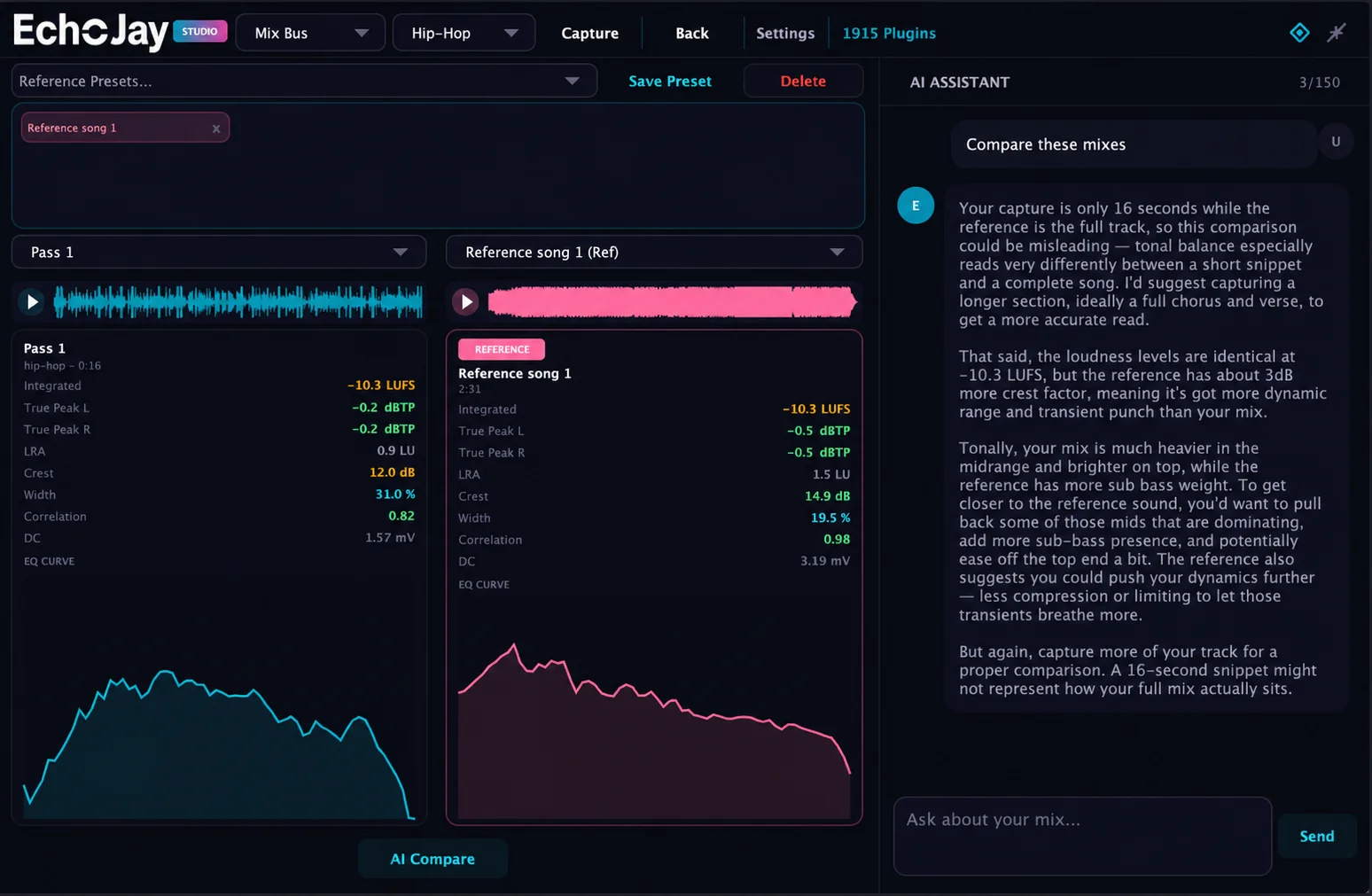
Drop a commercial track as a reference. EchoJay analyses it locally and stores the results — LUFS, EQ curve, stereo image — so you can compare your mix against the pros.
New
AI Compare
Select your mixes and references side by side, then hit AI Compare. The AI gives a detailed breakdown of how your tracks measure up — works with full albums too.
New
EQ Curves
8-band average spectrum analysis rendered as a smooth EQ curve in Compare Mixes. See at a glance where your mix differs from the reference — sub through air.
New
Revision Tracking
Drop V2 after V1 and EchoJay detects it automatically. Keeps the chat together and compares exactly what changed between versions. Track your progress.
Audio Playback
Replay any reviewed track with waveform scrubbing. Audio is stored server-side for Pro users — access your mix history from any device, any browser.
Pro
Plugin Chains
Add your plugins in Settings. When you ask for processing advice, the AI builds custom chains using only your plugins — with exact Hz, dB, ms, and ratio settings.
Personalised Setup
Tell EchoJay your monitoring setup, room treatment, plugins, and workflow preferences. The AI tailors every response to your actual environment.
New
Client Mix Notes
Add client briefs and revision notes after analysing. The AI factors in what your client asked for — not just what the numbers say.
New
30+ Genres
Hip-hop, drill, trap, pop, R&B, EDM, house, rock, jazz, classical, lo-fi, afrobeat, phonk, jersey club — the AI knows what good sounds like in your lane.
Particle Visualiser
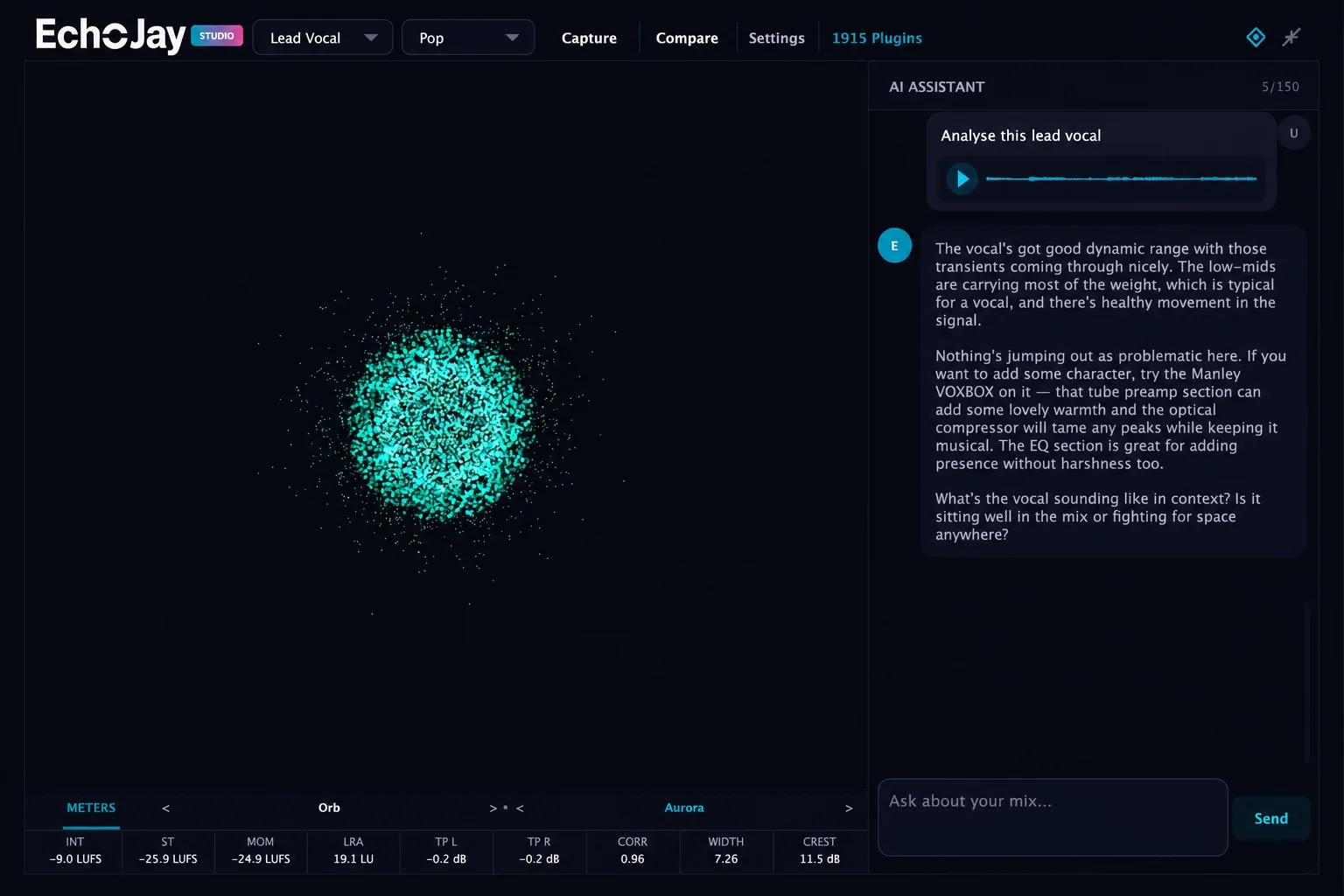
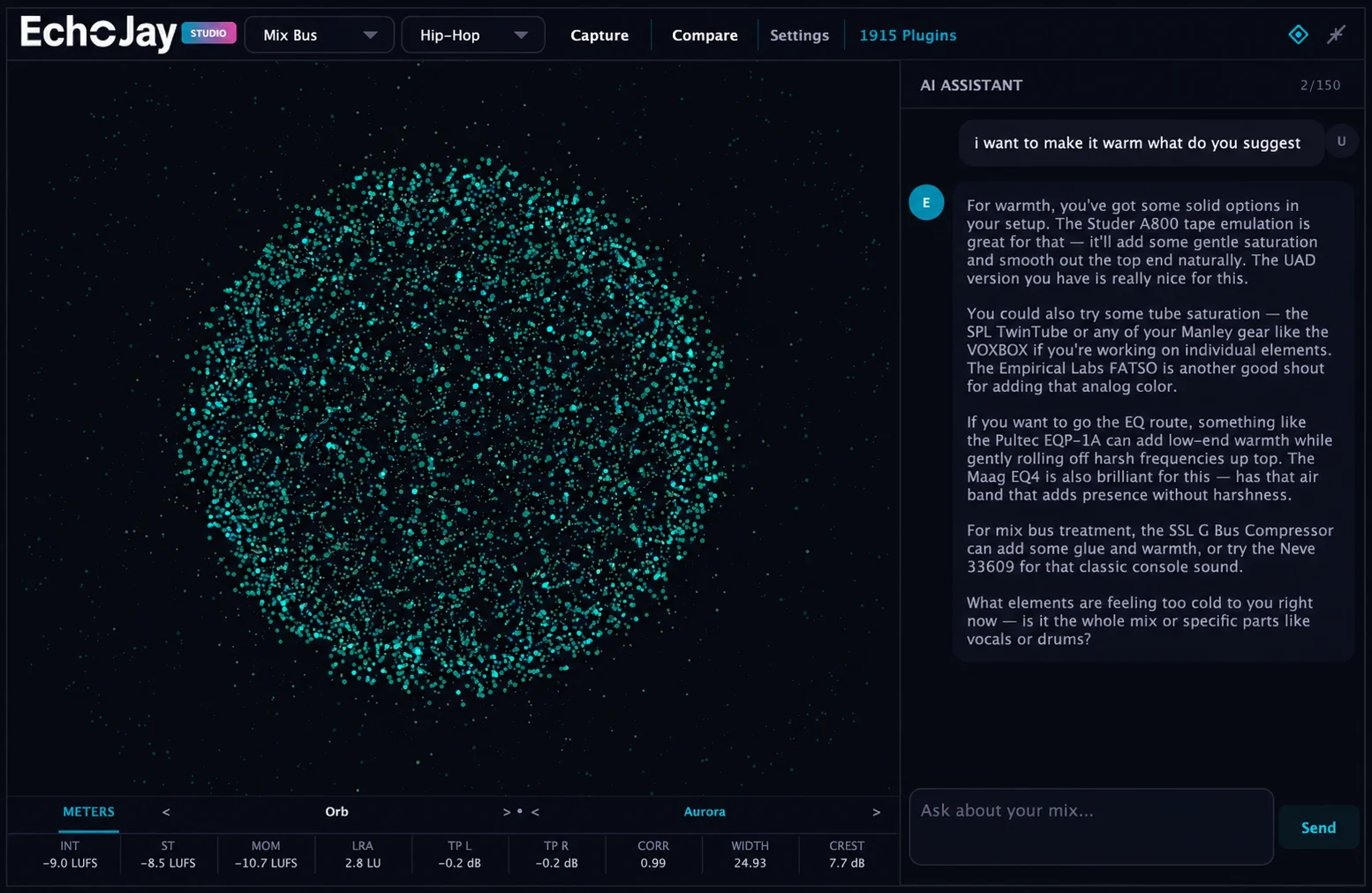
Audio-reactive OpenGL particle system with multiple presets — Orb, Helix, Ring, Nebula, and more. Six colour themes. Beautiful and informative at the same time.
Plugin
A/B Reference Playback
Load any WAV reference and play it through the plugin output. Smooth waveform scrubbing, play/pause from any view, spacebar control. Meters and spectrum react to the reference audio.
Plugin
Real-Time Spectrum
Smooth filled spectrum curve with Catmull-Rom interpolation, peak hold envelope, and log-frequency axis. A/B overlay fades when switching between your mix and reference.
Plugin
Channel Detection
The AI checks if your meter data matches the selected channel type. Route a full mix through "Lead Vocal" and it'll call it out — no wasted feedback on the wrong signal.
New
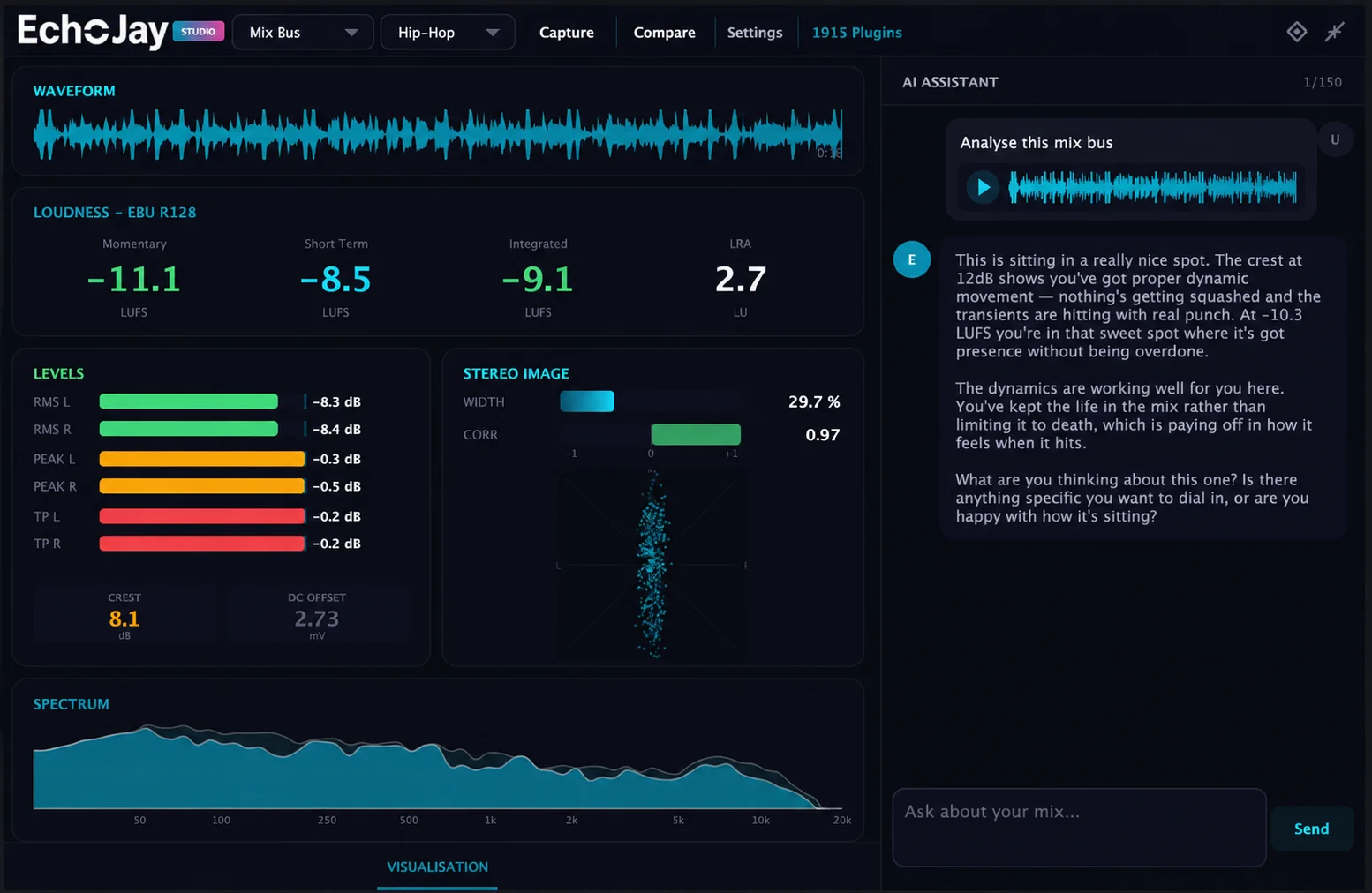
EchoJay Capture screen
DAW Plugin
Same engine. Inside your DAW.
EchoJay runs as a VST3/AU/AAX plugin on any channel or bus in your DAW — real-time metering and AI chat without leaving your session. Same account, same limits, everything synced.
What you get
EBU R128 loudness, true peak, stereo, spectrum
Mix feedback with genre-aware analysis
AI Compare — your mix vs reference side by side
A/B reference playback with waveform scrubbing
Capture snapshots and review mid-session
Audio-reactive particle visualiser
Real-time spectrum with peak hold
60+ channel types — vocals, drums, bass, synths, buses
Usage synced with the web app
Lightweight — near-zero CPU
Compatibility
VST3, AU, and AAX formats
Logic Pro, Ableton, FL Studio, Pro Tools, Reaper, Studio One, Cubase
Download EchoJay Plugin
Download for macOS
v1.2.3 · Intel & Apple Silicon · VST3/AU/AAX
Download for Windows
v1.2.3 · VST3 · Windows 10+
Free to download. Requires an EchoJay account.
AI messages use your plan's included quota.
EchoJay analysing a Lead Vocal channel
12
Real-time meters
Oversampled true peak
60+
Channel types
30+
Genres supported
How it works
Three steps to better mixes
01
Drop your track
Drag any audio file — WAV, MP3, FLAC, OGG, AAC. Select your genre and stem type. EchoJay plays it and starts metering instantly.
02
Read the numbers
Watch LUFS, true peak, stereo width, spectrum, and more update in real-time. Full track averages are calculated when playback finishes.
03
Get AI feedback
The AI reads your meter data and gives direct, specific advice. Compare against references, ask for plugin chains, or drop a new version to track progress.
EchoJay reference comparison
Why grounded data matters
Mix feedback is only as good as
the data it's based on.
EchoJay sits inside your DAW as a VST3, AU or AAX plugin and measures what's actually happening in your mix — integrated and short-term LUFS, true peak, crest factor, per-band spectral balance, stereo correlation and width. Those measurements travel with every question you ask, so the answer is always tied to your session.
General-purpose AI tools can listen to your track, but they describe it rather than measure it. There's no LUFS reading, no true-peak value, no crest factor — just impressions. That's useful for ideas. Less useful for decisions.
ChatGPT · Claude · Gemini
Input
Audio upload or text prompt
Process
Listens and describes what it hears
Vague AI waffle
"Strong rhythmic foundation. Vocals sit nicely in the mix. Try a touch of compression on the drum bus and consider widening the stereo image."
No measurement
EchoJay
Input
Real signal from your DAW bus
Process
Measures LUFS, peak, spectrum, stereo, dynamics
Hard numbers
"−14.2 LUFS integrated, −0.8 dBTP, 8.4 dB crest. Low end at +3 dB vs target — pull 80–120 Hz back 2 dB."
Grounded in data
EchoJay was built to close that gap — the explanatory power of a modern language model with the rigour of a meter you can trust.
EchoJay visualisation mode
Pricing
Start free. Scale when you need to.
No credit card required. Upgrade or cancel anytime.
Free
$0
Get started with the essentials
  • Full real-time metering suite
  • 15 AI messages per month
  • Compare Mixes view
  • Reference track analysis
  • No audio storage
  • No cross-device sync
Get Started
Studio
$19.99/month
For power users and studios
  • Everything in Pro
  • 400 AI messages per month
  • Personalised AI setup
  • Client mix notes
  • Priority AI responses
  • Buy extra credit packs
Upgrade to Studio
Need more messages in a session?
100 msgs — $5 350 msgs — $15 1000 msgs — $40
Credit packs available on Pro and Studio. Credits never expire.
FAQ
Common questions
Is my audio uploaded to a server?+
Plugin (VST/AU/AAX): No — your audio never leaves your machine. The plugin analyses everything locally inside your DAW. Only the resulting meter values (LUFS, true peak, stereo width, EQ curve, etc.) are sent to the AI for feedback. The audio itself stays on your computer.

Web app: Audio is processed in your browser using the Web Audio API. Pro users can optionally store mixes (as MP3) for playback across devices, but this is opt-in and you can delete files anytime.
Do you use my audio to train AI models?+
No — never. We don't use any audio, meter data, or chat content to train AI models, ours or anyone else's. Your sessions are private, used only to give you feedback in the moment.
What audio formats are supported?+
Plugin: Whatever your DAW handles — the plugin meters whatever audio is on the channel it's inserted on, at any sample rate or bit depth.

Web app: WAV, MP3, FLAC, OGG, and AAC. Any sample rate, any bit depth. Just drag and drop.
How accurate is the LUFS metering?+
EchoJay implements EBU R128 with K-weighted filtering and proper gating. True peak uses 4x oversampling. The readings match professional metering tools like Youlean and iZotope Insight, both in the plugin and web app.
Does the AI actually read my meter data?+
Yes — every meter reading (LUFS, true peak, stereo width, crest factor, EQ curve, channel mismatches and more) is sent to the AI with each review. It interprets the actual numbers from your specific track, not generic advice. This applies to both the plugin and the web app.
How does the channel-type setting affect feedback?+
When you tell EchoJay what kind of channel it's on (Lead Vocal, Kick, Bass, Mix Bus, etc.), the AI shifts what it focuses on. For lead vocals it checks sibilance, presence and mono placement. For kicks it prioritises transient punch and low-end weight. For mix buses it considers loudness, dynamics and tonal balance. The meters stay the same — it's the interpretation that changes.
How does reference track comparison work?+
Plugin: Load a reference track directly into the plugin and A/B with your mix in real time. The plugin shows side-by-side meters and EQ curves so you can spot differences as you tweak.

Web app: In Compare Mixes you can add references and full mixes — EchoJay analyses each one (LUFS, dynamics, stereo image, 8-band EQ curve) and shows them overlaid. Hit AI Compare for a detailed breakdown of what to fix.
Can I compare a full album?+
Yes — in the web app, add up to 8 tracks in Compare Mixes and hit AI Compare. The AI gives a thorough analysis covering consistency across the set, loudness spread, tonal balance and per-track feedback. It's designed for checking albums, EPs and playlists before release.
Do I need the web app if I use the plugin?+
No, but they complement each other. They share the same account and message limits. The plugin works inside your DAW during sessions, while the web app lets you drag in files, compare mixes, manage albums and access your full chat history. Most engineers use both — the plugin while mixing, the web app for review and final checks.
Can I cancel anytime?+
Yes — cancel anytime from your Stripe billing portal. You keep access until the end of your billing period. Your chat history and mix review data are preserved even on the free tier.
Support
Get in touch
Got a question, bug report, or feature request? We'll get back to you within 24 hours.
Message sent — we'll get back to you soon.
Stop guessing.
Start knowing.
Free to start, no credit card required.
Get Started Free